
About Themes
What is a theme?
A theme relates to the look-and-feel of your Experience. It determines its font, colors and styling. The Theme Designer allows you to amend these easily without the need for CSS or developer skills.
If you're like most of our customers, you will be using a theme that matches your brand guidelines, is responsive, and provides consistency between Experiences. But what if you need to make some changes now and again, to match specific imagery, a sponsor or sub-brand? Wouldn't it be great if you could just tweak the colors, spacing, typography or sizing without relying on a technical resource? And, without sacrificing responsiveness?
The Grow Theme Designer allows you to do just that!
The Theme Designer
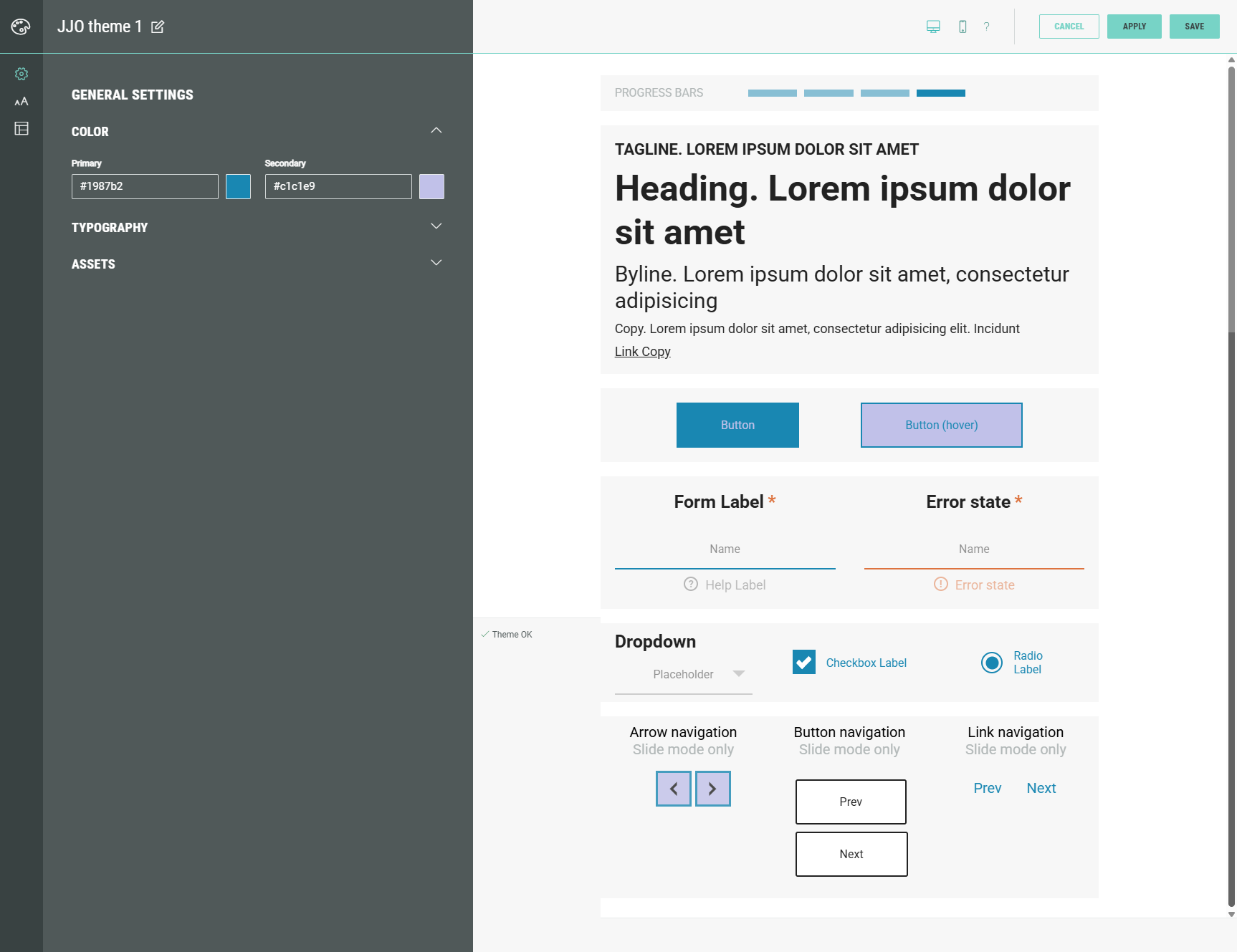
The Theme Designer shows settings on the left, and a live preview on the right.
The icons on the far left take you to sections for modifying styles for general settings, typography and key elements in your Experience.
Across the top, you can also see the preview options for responsive design modes (desktop and mobile).
The Theme Designer is pretty powerful. It can help you:
- Make style changes to a theme without any technical CSS knowledge.
- View changes straightaway via the built-in live preview.
- View and restore previous versions of a theme.
The following articles guide you through the process of creating and customizing a theme:
Video: Introduction to themes
